
Introduction
As global energy consumption continues to increase, the search for sustainable alternative energy technologies becomes increasingly important. Of the available options, bioenergy technologies like biodiesel fuels have garnered a considerable amount of attention. Biodiesels are renewable fuels that significantly lower emissions in CO2 compared to their non-renewable counterparts. However, with the commercial development of this technology, there is an overcapacity of glycerol as a by-product of biodiesel fuel production (Liang 2022). The abundance of glycerol can be a renewable source for the production of hydrogen, unlike typical processes seen today using non-renewable natural gas. It is becoming increasingly important to identify renewable sources of hydrogen, as hydrogen energy is highly efficient and non-polluting for the environment. One such process to generate hydrogen from a renewable source is glycerol steam reforming (GSR), and an application model regarding this method has been developed.
Model Definition
This application model exemplifies the usage of compressible isothermal flow setup with volumetric reaction chemistry in Barracuda Virtual Reactor (Barracuda). The reactor geometry modeled in this application is sourced from the work of Wang et. al’ 2016. Figure 1 shows the reactor model geometry, 0.3 m in diameter and 1 m in height. The catalyst used in the simulation is nickel based with fine sands added to aid fluidization. The sand is to account for a third of the total bed mass. The reactor wall is at a fixed temperature of 873 K and the initial catalyst bed height in the reactor is set to 0.2 m. Steam, glycerol, and nitrogen (with a molar ratio of 16.8 mol%, 2.8 mol%, and 80.4 mol%) are injected from the bottom Flow BC at a velocity of 0.5 m/s to fluidize the bed. The top boundary is defined as a pressure BC at atmospheric pressure.
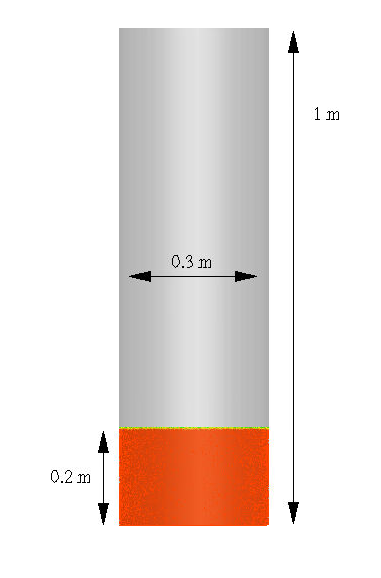
Figure 1: Reactor Geometry from Glycerol Steam Reforming Model Setup
The catalyst and sand particle sizes are an average diameter of 87.5 microns, and a WenYu-Ergun drag model is used for both the particle species. The material properties of the gases and solid particles are a function of temperature in this simulation. All gases are assumed to show ideal gas behavior.
Reaction Kinetics
In the glycerol steam reforming process, the majority of glycerol (C3H8O3) is converted into CO2 and H2 through a glycerol decomposition reaction, a reversible water gas shift reaction, and a reversible methanation reaction.
$$ D e c o m p o s i t i o n: C_3H_8O_3 \rightarrow 3CO + 4H_2 $$
$$ WGS: CO + H_2O \iff CO_2 + H_2 $$
$$ M e t h a n a t i o n: CO + 3H_2 \iff CH_4 + H_2O $$
The reaction kinetics for decomposition, water-gas shift, and methanation reactions taken from Macedo 2019 and Xu and Froment’ 1989 are shown below.
\begin{align}
R_1 &= k_1 p_{C_3H_8O_3}^{0.12} \\
R_2 &= \frac{k_2}{p_{H_2}(DEN)^2}\left({p_{CO}p_{H_2O}} – \frac{p_{H_2}p_{CO_2}}{K_{\mathrm{II}}} \right) \\
R_3 &= \frac{k_3}{p_{H_2}^{2.5} (DEN)^2}\left(\frac{p_{H_2}^{3}p_{CO}}{K_{\mathrm{III}}} – p_{CH_4}p_{H_2O} \right)
\end{align}
\begin{align}
DEN &= 1 + 0.01K_{CO} P_{CO} + 0.01K_{H_2} P_{H_2} + 0.01K_{CH_4}P_{CH_4} + \frac{K_{H_2 O} P_{H_2 O} }{P_{H_2}} \\
\end{align}
The rate coefficients k1, k2 and k3 given by Macedo 2019 are as follows.
\begin{align}
k_1 &= 7.28 \times 10^{-3} exp\left(\frac{-4305.99}{T} \right) \ mol \cdot kPa^{-0.12}/(g_{cat} \cdot s) \\
k_2 &= 9.90 \times 10^{1} exp\left(\frac{-10732.5}{T} \right) \ mol \cdot kPa/(g_{cat} \cdot s) \\
k_3 &= 5.19 \times 10^{10} exp\left(\frac{-30912.9}{T} \right) \ mol \cdot kPa^{-0.5}/(g_{cat} \cdot s) \\
\end{align}
The equilibrium constants KII and KIII given by Macedo 2019 are as follows ,
\begin{align}
K_{\mathrm{II}} &= \exp\left(\frac{4400}{T} – 4.036 \right) \\
K_{\mathrm{III}} &= \exp\left(\frac{26830}{T} + 30.114 \right) \\
\end{align}
The adsorption equilibrium constants KCH4, KH2O, KCO and KH2 given by Xu and Froment’ 1989 are as follows,
\begin{align}
K_{CH_4} &= 0.179 exp\left(\frac{-4604.28}{T} – 5.5945 \right) bar^{-1} \\
K_{H_2 O} &= 0.4152 exp\left(\frac{-10666.3}{T} + 12.9603 \right) \\
K_{CO} &= 40.91 exp\left(\frac{8497.1}{T} – 13.1137 \right) bar^{-1} \\
K_{H_2} &= 0.00296 exp\left(\frac{9971.13}{T} – 15.3 87 \right) bar^{-1} \\
\end{align}
Results and Discussion
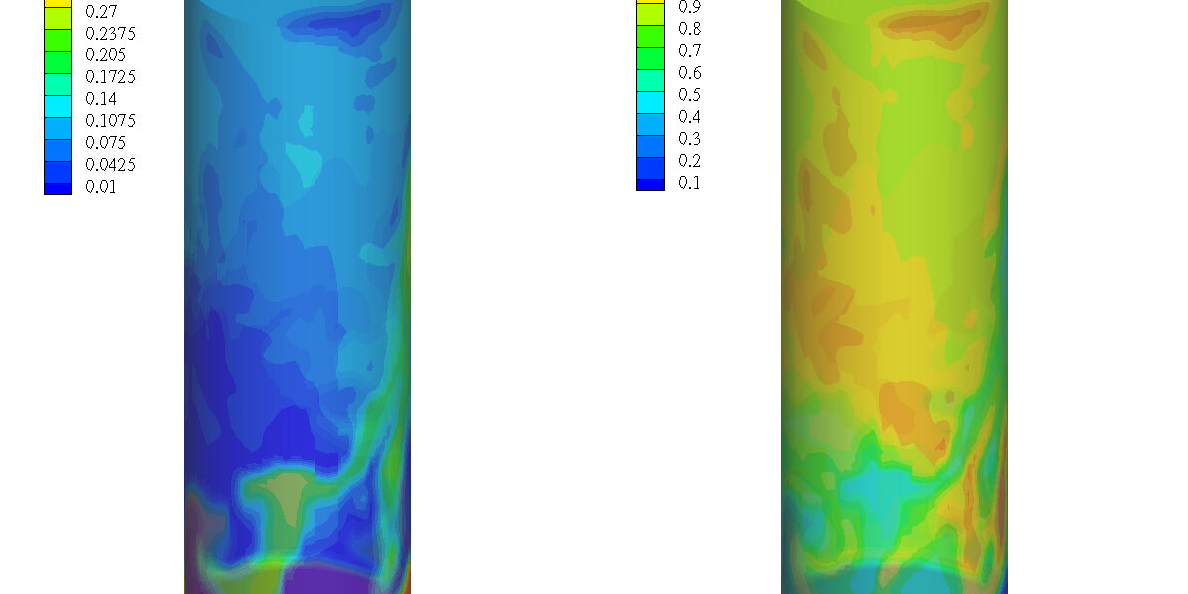
Figure 2 shows the Barracuda simulation predicted glycerol consumption and H2 production (mol/m3) in the bubbling fluidized bed reactor. The glycerol is fed from the bottom of the reactor, reflected by the portion marked in a dark red color in the left most figure. The glycerol that is fed will react quickly, and as the height of the reactor increases, the concentration of glycerol decreases. As the height of the reactor is increased and more glycerol has been reacted, the concentration of hydrogen in the reactor is shown to increase. There appears to be a linkage spatially between the consumption of glycerol and the formation of hydrogen product.
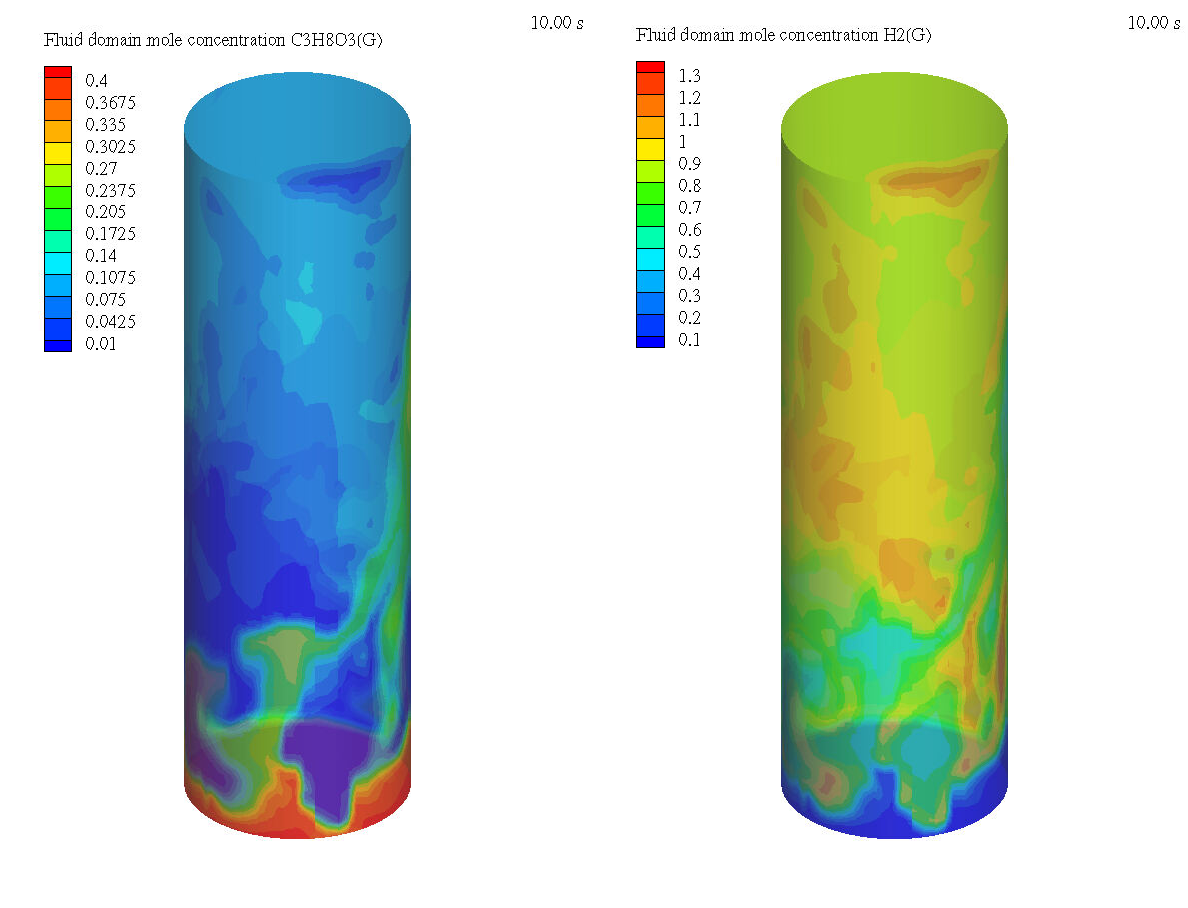
Figure 2: Molar Concentration of Glycerol vs Molar Concentration of H2 in the Glycerol Steam Reforming Model.
Modeling Instructions
Glycerol Steam Reforming (GSR) Reactor Simulation Setup
The user is expected to have already gone through basic Barracuda training Barracuda Virtual Reactor New User Training | CPFD Software (cpfd-software.com).
- Download the support files provided along with this post.
- Unzip the support file and place it in the working directory setup for this GSR project.
- Open a new Barracuda session.
- From the File menu, choose Open Project. Navigate to the working directory and select GSR.prj.
The project file has already been setup with the appropriate
- Grid.
- Base Materials.
- Particles.
- Initial Conditions
- Fluid ICs.
- Particle Species.
- Boundary Conditions
- Pressure BCs.
- Flow Bcs.
The chemistry setup for this project, which is already setup, is described in detail below.
Chemistry
Rate Coefficients
The reaction kinetics described above need to be converted into a format that is acceptable for inputting into Barracuda.
- Under Chemistry select Rate Coefficients. Click Add to bring up the Chemistry Coefficient Editor. Volume-Average, which is the default reaction type, is used for for kinetic constants k1, k2, and k3, equilibrium constants of reaction KII and KIII, and the adsorption equilibrium constants KCH4, KH2O, KCO, and KH2.
- Reaction kinetic constant k1 will be first input into Barracuda. The units of k1 are mol /gcat ⋅ kPa ⋅ s these need to be converted to mol /m3 ⋅ kPa ⋅ s in the Chemistry Coefficient Editor as shown in the following steps.
- Multiply k1 by 1000 to convert the units to per kgcat.
- Multiply 7.28×10-3 by 1000 and input the value as CO in the Chemistry Coefficient Editor. Leave Type set to Arrhenius Chem Rate.
- Click on Particle dependence in the Chemistry Coefficient Editor.
- In the Particle dependence window, from the Project Materials List add Ni to the Materials List. For Material coefficient type select mass.
- Click OK to close the Particle dependence window.
- Select Mass unit as kg/m3 in the Chemistry Coefficient Editor.
- Divide k1 by θf. Where θf is the volume of fluid in a given control volume.
- To do this put -1 in for C4 in the Chemistry Coefficient Editor.
- The values in the exponential in k1 are multiplied through and divided by the Universal gas constant R = 0.008314 KJ/mol ·K.
- Enter 30912.9 for E.
- Enter 0 for E0.
- Optional: Add units mol /m3 ⋅kPa ⋅s in the comment box.
- Multiply k1 by 1000 to convert the units to per kgcat.
- Reaction Kinetic constant k2 and k3 can be entered in the same way following the steps given above for k1.
- The equilibrium constants of reaction KII and KIII are in an acceptable format for inputting into Barracuda and can be entered directly.
- The adsorption equilibrium constants KCH4, KH2O, KCO and KH2 are also in an acceptable format for inputting into Barracuda and can be entered directly.
- Reaction kinetic constant k1 will be first input into Barracuda. The units of k1 are mol /gcat ⋅ kPa ⋅ s these need to be converted to mol /m3 ⋅ kPa ⋅ s in the Chemistry Coefficient Editor as shown in the following steps.
Reactions
To finish setting up the chemistry portion of this simulation, the decomposition, water-gas shift, and methanation reactions need to be entered into Barracuda.
- Under Chemistry select Reactions. Click Add ⇒ Volume-Average: Stochiometric rate equation to bring up the Chemistry Stochiometric Equation Editor.
- Under Equations Units select mol/m3/sec for Reaction rate units and kPa for Fluid species units.
- Enter the Stoichiometric reaction for glycerol decomposition as shown in figure 3.
- Enter the rate equation R1 for the stochiometric reaction as shown in the box R00.
- Click OK to close the Chemistry Stochiometric Equation Editor.
- Repeat steps 1 to 4 and enter all of the remaining reactions.
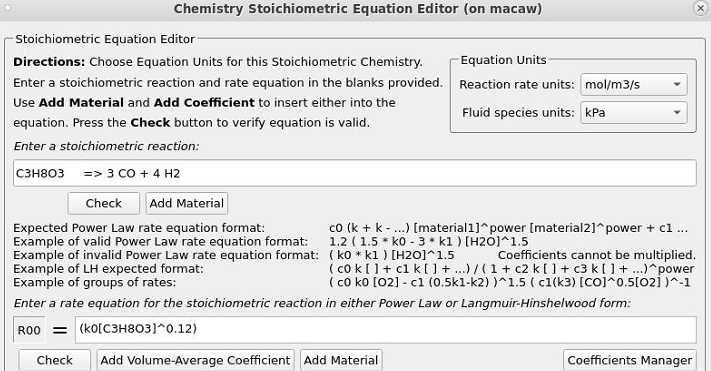
Figure 3: Volume-average Stoichiometric Reaction and Reaction Rate for GSR Model Setup
Time Controls
- Enter 1.5e-4 secs for Time Step and 10 secs for End Time.
- Put 0.1 secs for Restart Interval.
Visualization Data
- Enter 60 secs for Output file interval.
- Select the Visualization Data for post processing as shown in figure 4.
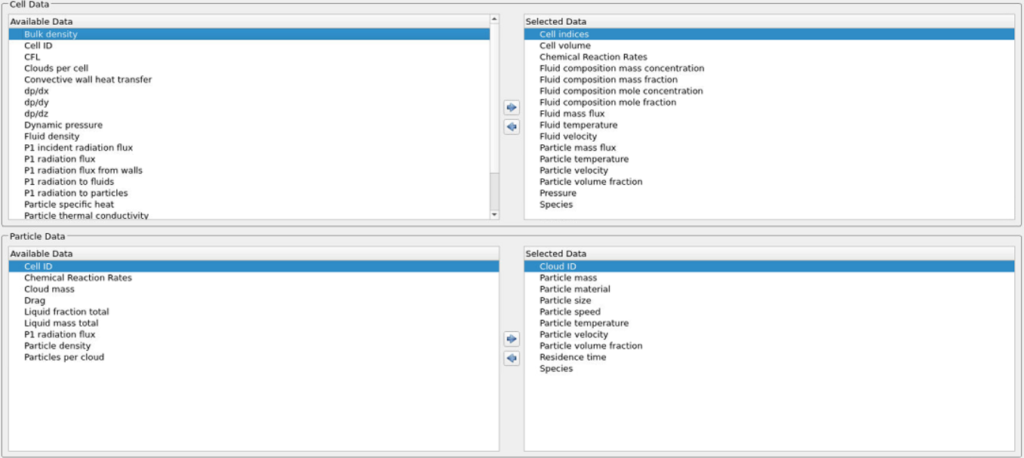
Figure 4: Selected Visualization Data for Glycerol Steam Reforming Reaction Model
Run
- Click on Run and then click on Run Solver.
- Select GPU Parallel if you have the required GPU parallel license.
Post Processing GSR Results in Tecplot
The user is assumed to have gone through basic Tecplot training Getting Started With Tecplot For Barracuda® | CPFD Software (cpfd-software.com). So only a few brief steps for post processing the results are explained.
- In the Barracuda GUI click on Post-Run and then click on View Results.
- Deselect Scatter from the Plot menu.
- Check Contour Box
- Click on settings beside Contour to open up the Contour & Multi-Coloring Details window.
- From the drop down list select Fluid domain mole concentration C3H8O3(G).
- From the drop down list under Color map options select Modified Rainbow – Less Green.
- Click on Set Levels and set the Minimum level to 0.1 and Number of levels to 13.
- Click on Close button to close the Contour & Multi-Coloring Details window.
- To create the plot shown in Figure 2, the user is expected to have already gone through the training material in “Tecplot for Barracuda – Using frames” (Tecplot for Barracuda – Using Frames | CPFD Software (cpfd-software.com)).
- Click on the outside of the frame ensuring that the entire frame is selected.
- Copy and paste the frame, and select Tile Frames under the Quick Macro Panel.
- Select Frame, then Frame Linking, and turn on Solution Time and 3D Plot View.
- For the second contour plot, from the dropdown list as in step 3, select Fluid domain mole concentration H2(G).
- Set levels accordingly and color map distribution as described in steps 4-5.
This concludes the description of the simulation setup process for Application Model: Hydrogen Production with Glycerol Steam Reforming (GSR) in Barracuda Virtual Reactor.
References
Liang, Yang, Gao, Hu, Wang, MP-PIC investigation of glycerol steam reforming in bubbling fluidized bed for high-quality hydrogen production. Renewable Energy, 198, 319-333
Macedo, Soria, Madeira, Glycerol steam reforming for hydrogen production: Traditional versus membrane reactor. International Journal of Hydrogen Energy, 44, 24719-24732
Wang, Song, Chen, Wang, Lu, Insights in Steam Reforming of Glycerol in a Fluidized Bed by Computational Fluid Dynamics Modeling. Energy Fuels, 30, 8335-8342
Xu, J., & Froment, G. F. (1989). Methane steam reforming, methanation and water‐gas shift: I. Intrinsic kinetics. AIChE journal, 35(1), 88-96.